
Making a Very Bad Scripting Language Part 2: Syntax Highlighting
When I first attempted to add syntax highlighting support for my data-serialization language, I ran into issues because I mistakenly believed syntax highlighting was limited to a single line.1 I thought that meant that I’d need to make a language server, which was beyond the scope of what I wanted to do.
My scripting language (Kevin’s Very Bad Scripting Language, or KVBSL for short),2 however, is all single-line statements, so it felt like it would have a much more trivial setup.
The Set Up
VSCode’s documentation is useful for getting started. It has a tool called Yeoman, which can generate the initial extension boilerplate for you.
It’s mentioned in both the documentation and the example that Yeoman gives you, but something I got wrong is that I didn’t have the . in my extension, putting kvbs instead of .kvbs. Thankfully, that’s easily corrected in package.json.
Yeoman creates a language-configuration.json and *.tmLanguage.json file that are prepopulated with some initial rules.
Fixing language-configuration.json
Yeoman drops you in with pre-populated segments for comments, brackets, autoClosingPairs, and surroundingPairs. The documentation for this file is better than anything I’d write here.
This file doesn’t control syntax highlighting; instead, it defines basic editor behaviors like commenting out lines or bracket highlighting.
For comments, KVBSL only supports a # at the start of the line, so I changed the comments block to:3
{
    "comments": { "lineComment": "#" },
}
Similarly, my language doesn’t support brackets, so I deleted that section. For autoClosing pairs, I deleted everything in that section apart from double and single quotes. Same with surroundingPairs.4
I ended up with a relatively trim file:
{
    "comments": { "lineComment": "#" },
    "autoClosingPairs": [ ["\"", "\""], ["'", "'"] ],
    "surroundingPairs": [ ["\"", "\""], ["'", "'"] ]
}
Fixing kvbsl.tmLanguage.json
This is the hard part. tmLanguage.json files are hard to puzzle out on their own and rely on scopes and names that aren’t necessarily clear, even from the VSCode documentation. It points you to the TextMate documentation, suggests using yaml instead of json, and then kind of throws its hands up and says “figure it out yourself.”
I started by deleting the examples it threw in there.
{
	"$schema": "https://raw.githubusercontent.com/martinring/tmlanguage/master/tmlanguage.json",
	"name": "Kevin's Very Bad Scripting Language",
	"patterns": [],
	"repository": {},
	"scopeName": "source.kvbsl"
}
At this point, you can try it out. If you press F5, it will open up a new VSCode window with the extension loaded.5 I made a simple file in samples/test.kvbs to verify:6
# Sample KVB Script
log "Starting"
wait 1.0
and log "Parallel A"
and log 'Parallel B'
bg log "Background"
test true
If you’ve done everything right, it will identify your script’s language.
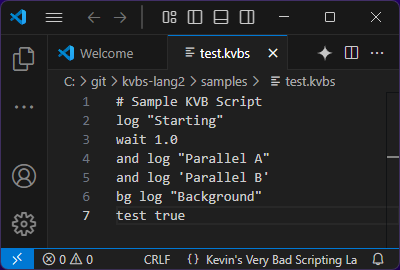
You can then toggle Developer: Inspect Editor Tokens and Scopes in the command palette to see how it’s being tokenized for syntax highlighting. Currently, since we’ve not established any rules yet, they all get marked as source.kvbsl.
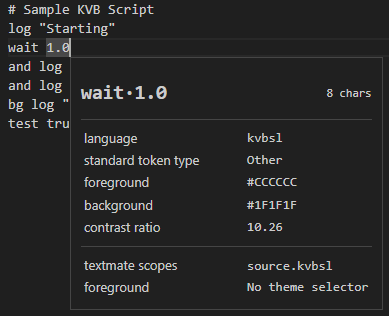
Unfortunately, now we need to understand how TextMate grammars work. Let’s start with patterns. Patterns are the cornerstone of the grammar, and represent, in its simplest form, a regex match.
The first thing I want to match against is comments. In KVBSL, they must be at the start of a line and take up the whole line. I’m not going to explain how the regular expressions I’m making work, because I’m bad at explaining things and there are a million regex explainers already,7 but here’s the regular expression. The whole line match is necessary, as it would match against foo command #arg otherwise, which I do not want.
"patterns": [
    {
        "name": "comment.line.number-sign.kvbsl",
        "match": "^\\s*#.*$"
    }
],
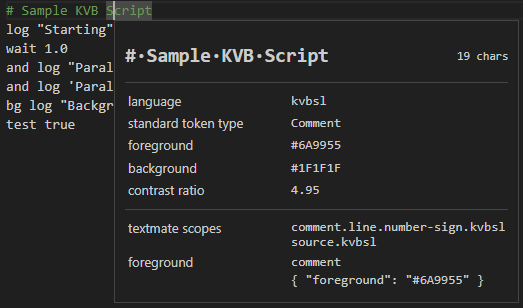
Using F5 to open up my sample file, the comment highlighting is already working! Exciting. The comment.line.number-sign.kvbsl scope is correctly applied.
Now, before I do the harder parts, I’m going to get it to recognize strings, integers, floats, and booleans.
"patterns": [{
    "name": "comment.line.number-sign",
    "match": "^\\s*#.*$"
}, {
    "name": "constant.numeric.int",
    "match": "\\s*\\d+\\s"
}, {
    "name": "constant.numeric.float",
    "match": "(?i)\\s*[+-]?\\d+\\.\\d+f?\\s"
}, {
    "name": "constant.language.boolean",
    "match": "(?i)\\s*(true|false|yes|no)\\s"
}, {
    "name": "string.quoted.double",
    "begin": "\"",
    "end": "\"",
    "patterns": [{
        "name": "constant.character.escape",
        "match": "\\\\."
    }]
}, {
    "name": "string.quoted.single",
    "begin": "'",
    "end": "'",
    "patterns": [{
        "name": "constant.character.escape",
        "match": "\\\\."
    }]
}, {
    "name": "string.unquoted",
    "match": "[^\\s]+\\s"
}],
As long as you know regular expressions, these should be relatively straightforward to understand, with (perhaps) two exceptions:
- Evaluation order
Patterns are processed in the order of the array. First it checks if it’s a comment line (consuming it), then it checks if it’s an integer, then a float, etc. This is crucial not only to avoid interpreting parts of comment lines as commands, but also to ensure that integers are recognized before floats.8
- Quote handling
Quote handling ends up being in a different format. See, these begin/end patterns are for matching regions of text. begin tells the parser that a block is beginning, and end signifies where it ends. For quotes, this is easy; they’re both a quote.9
These patterns can also contain more patterns, like in the case of the escape character. This both tells the parser that something like \' is an escaped character and prevents it from matching against the end. Now the end rule has a higher priority than the patterns, but because it goes character by character, and the \' matches on the character before it would match against the end, and consumes both.
Some fun weirdness—my argument rules all expect whitespace to terminate them, which should cause the last token in the file to fail (unless there’s an extra newline). It doesn’t. I assume whatever runs these rules appends a newline to every line to make this exact case function correctly.
Handling commands
Now, I’m handling parsing arguments and comments, but I’m neither handling the commands nor the concurrency operators (and and bg). To do that effectively, we’re going to have to handle that in the grammar with another new construct.10
"patterns": [{
    "name": "comment.line.number-sign",
    "match": "^\\s*#.*$"
}, {
    "name": "meta.line.command.concurrent",
    "match": "^\\s*(?:(and|bg)\\s+)?([^\\s]+)",
    "captures": {
        "1": {
            "name": "keyword.control.concurrency"
        },
        "2": {
            "name": "entity.name.function"
        }
    },
},
// the rest of the patterns
]
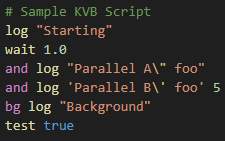
This uses the concept of captures, which basically takes a regex with capture groups (the bits surrounded by parentheses) and lets you assign these captures to scopes. The 0th capture group is the entire value, so it’s not used here. This will correctly assign the concurrency scope to and and bg, only at the start of the line.11 It then assigns the next space-delimited value the entity.name.function scope.12
And with that, we’re done with the grammar!
Known errata
As mentioned in the footnotes above, there are three differences in highlighting from how the scripts will be run:
-
This doesn’t handle cases where the command function is either single quoted or double quoted.
"log this" hiwould attempt to invoke thelog thiscommand with the valuehi. This is an edge case that I don’t want to encourage, and I also don’t want to complicate my regular expressions for this. This is something that I would correct if it was using a real parser (myCommandParserdoes this, after all), but not a lexical parser using regular expressions. -
In my scripting language, quotes are implicitly closed when exiting a line, and will not cause a parse error. They will cause the syntax highlighting to break which, once again, I find desireable.
-
It will treat a sole
bgorandas a command of the given name with no arguments, whereas the scripting engine will turn those into no-ops.
Packaging
You just type vsce package. Easy.13
Conclusion
Having a very constrained language made this a fairly straightforward foray into syntax highlighting using TextMate grammars in VSCode. In doing so, I finally got my head around a format that looks pretty opaque from the outside. I also saw that what I thought was impossible (multi-line string handling) is actually possible using the begin/end blocks, so I could have done this for my data serialization language.
The Future?
Having a tiny language is a boon for testing these things out. In the future, I’d like to experiment with a language server, which would let me do proper parsing, show what types an argument is coercable to, and maybe even allow specifying command signatures.
-
In case you were wondering, I only saw the documentation for the
matchrule, which as far as I can tell, does have that restriction. Thebeginandendversion has no such limitation. ↩︎ -
Not at all confusing with Kevin’s Very Bad Data Serialization Language, or KVBDSL. ↩︎
-
For some reason, the line comment gets an incorrect type annotation if you just have an independent string, but it’s the format that the generated boilerplate had, so I assume it works. ↩︎
-
These seem fairly self-evident to me, but once again, check the documentation at the start of the section if you’re confused as to what any of these do. ↩︎
-
This also pops up an easy-to-miss bar with controls in it, including the ability to restart the window. Ctrl+Shift+F5 is the default shortcut for that. It doesn’t hot reload, so you will need to manually restart it. ↩︎
-
Sadly, no syntax highlighting for KVBSL on my blog… yet? ↩︎
-
And I just don’t want to. ↩︎
-
This doesn’t actually matter for the highlighting, as they’ll both show up the same. It is relevant if you’re running commands, as integers can be coerced to both floats and ints, whereas floats can only be coerced to floats. Often languages parsers have the opposite problem, where integers steal parts of floats and break parsing that way. ↩︎
-
In my language, if you forget to close a quote, it implicitly terminates at the end of the line. That differs from this grammar, where it will ‘spoil’ later lines with the wrong highlighting. This should help people notice what is effectively a typo in their script. ↩︎
-
Sometimes when I’m writing blog posts, I discover that I’m actually doing something in an unnecessarily complex way. That’s part of the reason that I write things—so that I can justify decisions that I hadn’t fully explored before. I’d thought I had to use
begin/endcapture groups with a link to the repository (or inlined) patterns, but that simply does not seem necessary on second glance. ↩︎ -
If you write a bare
andorbgwith no following command, the grammar will highlight it as if it were a valid command. The actual scripting engine treats those as no-ops, but it will be misleading when it comes to syntax highlighting. ↩︎ -
This doesn’t handle cases where the command function is either single quoted or double quoted.
"log this" hiwould attempt to invoke thelog thiscommand with the valuehi. ↩︎ -
It’ll probably have a few picky complaints that it makes you fix or skip past, but they’re not larger obstacles. ↩︎