
Making a Bad Image Pipeline: Newline Corruption
Background
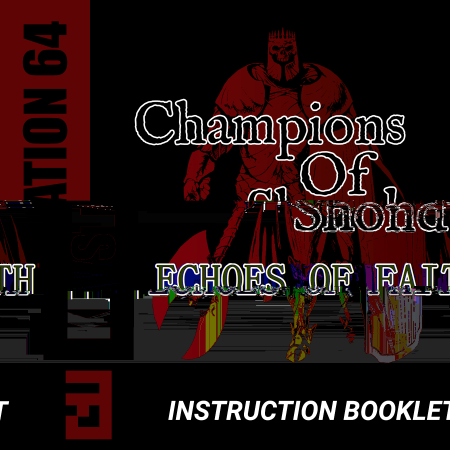
Back in 2023, I was working on the game Champions of Shond: Echoes of Faith. It’s a first person dungeon crawler, and in order to make it feel authentic, I created a manual.
Being the dutiful backer upper that I am, I checked this pdf into source control using git. However, I was surprised to see that the cover image had gotten corrupted. I figured I’d done something wrong, so I did it again. The issue reappeared. I did a quick search, and found out that it was git’s newline normalization acting on the pdf file, messing up its encoding. The fix was simple—just turn that off for pdf files.
I found the look cool, though, and I’ve kept the corrupted file on my desktop ever since. It was only at the end of May, months after I started my image pipeline project, that I finally thought “hey, maybe I can make an effect like that.”
As usual, press and hold on the image to compare with the source. In a rare diversion, I’m not using my raccoon.png, but the effect that triggered the whole thing.

What is git’s newline normalization?
Git is a source control program, which means that it lets you take snapshots of your work so that you can look at what it looked like last week or last month, and lets you get back to a previous state if you mess things up.
For the most part, git backs up text files (source code for programs). It’s used across different operating systems (Windows, Linux, Mac), and it turns out that these differ in several ways. One way they differ is how text files represent what happens when you press the enter/return key to move to a new line.
Text is encoded in a series of bytes. This can vary, but nowadays it’s mostly encoded using something called Unicode. This is just a standardized way of turning characters that you can type, like ‘A’, ‘Z’, ‘1’, or ‘🦝’ into bytes. In Unicode UTF-8, these are 41,1 5A, 31, and F09FA69D,2 respectively.
Getting back to how the “put the next text on a new line” instruction is represented, it actually differs based on the operating system. For Mac and Linux, this new line instruction (or newline) is represented by the “line feed” (LF) character, which is encoded as 0A. On Windows, however, it uses a combination of a “carriage return”3 (CR) character (encoded as 0D) followed by the LF character. This combination is encoded as 0D0A. That means that when transferring files between the two, you can have text documents display incorrectly.4
Going back to git: the authors of git knew that it would be used across different operating systems with different ways of encoding characters, and they both wanted to make sure that it would work correctly across operating systems, but also make sure that the text file wouldn’t be littered with unnecessary changes if someone on another operating system touched a file that used the other new line characters.
To do this, they take all the 0D0A sequences and convert them to 0A when the changes are saved to the source control record, and, if you’re on Windows, they convert 0A sequences to 0D0A when you restore them.5
Now, the concept of CR and LF are only really relevant to text files. If you do that normalization to other files, you will corrupt the results, causing the file to get corrupted and render or behave incorrectly. Normally, git is pretty smart. It knows not to do that for image or executable files. I’m not sure if it was a mistake I made on my end, or an eccentricity of the default behavior on git, but it was running this on my pdf files.6
Why did it fail in this way?
Okay, so we know that git was deleting random bytes from my image. That’s bad. Looking at it, it seems like the first 0D0A sequence that it converted to 0A was around halfway through the image. But I’d expect it to be a lot worse. One of the ways that images are represented is just to have the colors in bytes (basically hex codes, like #FFFF00
, but without the ‘#’ and stored as FFFF00). It’s possible for 0D0A to show up in any image, it’s just numbers (e.g. #880D0A
).
Because it is modifying the number of bytes, I expected it to permanently alter which color channel bytes were being represented in.7 For instance, let’s assume we had this color sequence: FF0D0A
00FF00
0000FF
. If we replace the 0D0A at the start with 0A, the colors would become FF0A00
FF0000
00FF00
. It would shift all the color channels left one (green → red, blue → green, blue → red) for the rest of the image (or until another 0D0A came and shifted it again), but it hasn’t. You can check the image at the top. The change is localized, and sometimes it’s just shifting some rows to the right wholesale.
This means that the image isn’t just being stored as raw RGB888 bytes. It must have some sort of encoding. My assumption was that it was being stored in the png format,8 but it could have been any number of image formats. So, I decided to inspect the pdf to find out how the image was being stored.
A pdf file is just a container. It can store text, images, formatting, and probably some other things (I don’t know how pdf works internally, and I don’t make or open many). Thankfully, I don’t actually need to know the details of how it works. There is a python library called pikepdf that will read it for me. That’s both fortunate, since I don’t need to do the work, but also unfortunate, since I need to write python.
Here’s the script. It looks for the image on the first page, as that’s where the corrupted image was.9
import pikepdf

pdf = pikepdf.open("Manual.pdf")

# Get the first image from the first page
page = pdf.pages[0]
name, image = next(iter(page.images.items()))

print(f"image name: {name}")
for key in ("/Filter", "/DecodeParms", "/ColorSpace",
            "/BitsPerComponent", "/Width", "/Height"):
    print(f"{key}: {image.get(key)}")

# The first two bytes of the stream identify the file type
raw = image.read_raw_bytes()
print(f"first bytes: {raw[:2].hex()}")
Running it spits out:
image name: /I0
/Filter: /FlateDecode
/DecodeParms: None
/ColorSpace: /DeviceRGB
/BitsPerComponent: 8
/Width: 1350
/Height: 1350
first bytes: 78da
/Filter: /FlateDecode: “Flate” is DEFLATE, a compression algorithm. So the bytes didn’t represent an image format (directly), it represented a compressed file. That explains why deleting a couple of bytes didn’t just shift the color channels: the bytes being deleted were compressed data, not pixels.first bytes: 78da: The first bytes of a file usually indicate the format.78is the standard two-byte header for a zlib stream (zlib is a compression library), and theDAsignals best compression./ColorSpace: /DeviceRGBand/BitsPerComponent: 8: This tells us that once it’s decompressed, the pixels will plain RGB with 8 bits (one byte) per channel. This is just RGB888./DecodeParms: None: This was a surprise for me. If this were png, it would record this here. This was just raw RGB888 pixels, not the png I’d assumed./Width: 1350and/Height: 1350are just the dimensions, but they’re handy to have for later when we want to reassemble the bytes back into an image.
Fortunately for me, it being RGB888 makes reproducing it easier. I don’t need to encode my image into a png or back out; I already have the file in RGB888 format, so it’s easy.
Well, relatively easy. I still need to reproduce zlib compression. How hard could it be?10
Thankfully, someone already did the work for me. The pako library is an implementation of zlib in JavaScript.
Invoking it is easy:
const packed = new Uint8Array(N);
for (let p = 0, s = 0, d = 0; p < pixels; p++, s += 4, d += ch) {
    packed[d] = src[s];
    packed[d + 1] = src[s + 1];
    packed[d + 2] = src[s + 2];
}
const compressed = pako.deflateRaw(packed, {
    level: this.level as pako.DeflateOptions['level']
});
This drops the alpha channel, as my initial goal was to see if I could reproduce the pdf glitch exactly.
Next we turn 0D0A sequences to 0A as a recreation of git’s normalization behavior.
const CR = 0x0D;
const LF = 0x0A;

const out = new Uint8Array(data.length);
let w = 0;
for (let i = 0; i < data.length; i++) {
    if (data[i] === CR && data[i + 1] === LF && rng() < prob) continue;
    out[w++] = data[i];
}
const mangled = out.subarray(0, w);
Note: if any bytes get deleted, this doesn’t pad them out. This is slightly different from what the pdf would do (it would just read whatever was next in the file), but this doesn’t make a difference for reasons I get into later.
Now we just inflate/decompress it, right?
const reconstruction = pako.inflate(mangled);This throws with incorrect data check.11 For most cases, this is desirable. You want to know that the compressed file is messed up and that you shouldn’t try to use it. For us, it’s useless, since we don’t get any of the data.
What we want to do is mimic pdf behavior, where it’ll usually just try to show you as much of the image as it can before zlib gives up the ghost. Thankfully, pako also gives us that:
const chunks: Uint8Array[] = [];
let total = 0;

const inflator = new pako.Inflate({ raw: true });

// Push all the chunks into an array that we can reconstruct later.
// This seems to be consistently called with 65536 (2^16) byte chunks.
inflator.onData = (chunk: pako.Data) => {
    const u8 = chunk as Uint8Array;
    chunks.push(u8);
    total += u8.length;
};

inflator.push(data, true);
// inflator.err will be true if it hit an unrecoverable error.

const result = new Uint8Array(total);
let off = 0;
for (const c of chunks) {
    result.set(c, off);
    off += c.length;
}
What this does is give us all the data we can take until we get to something that we can’t recover from. “Raw” in both this and the deflation step mean that it shouldn’t write the header or the checksum. These will never meaningfully alter the data (78DA doesn’t contain our byte sequences and the checksum is at the very end). The problem is that pako doesn’t give us the last chunk of data if the checksum doesn’t match, and it almost never will. Processing it raw means that we’ll succeed at getting the last chunk of data far more often.
I tossed my Shond cover in there it worked perfectly. It’s able to reproduce my cover glitch one to one. It felt like magic once I saw that.
Here’s the raccoon with this effect (not nearly as cool as the cover, in my opinion).
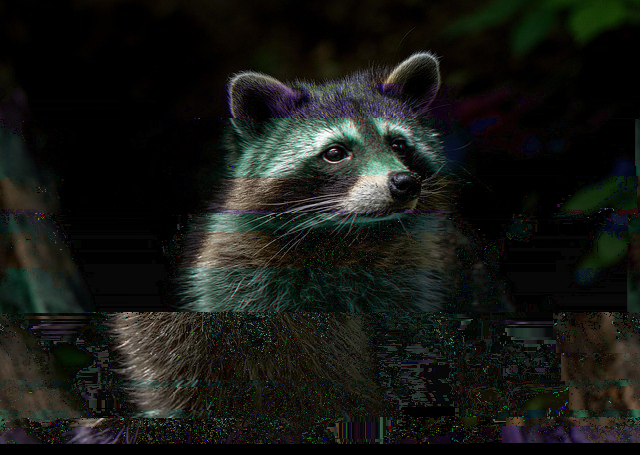

That raises a different question though: what causes an error to be recoverable? My naive assumption would be that the first chunk after the size changed would lead to unrecoverable corruption, but that’s not true. Even if the deletion occurred in the first byte, 65536 bytes is ~22k pixels, which would be about sixteen rows of my image, so either pako is trying to recover or it just doesn’t know something is wrong.
Note the black at the bottom—that’s where the decompression algorithm gave up entirely. Not sure if that happened on the instruction booklet, as the bottom’s all black anyway.
How does DEFLATE work?
DEFLATE compresses in a sequence of chunks. Each chunk starts with a three bit header. BFINAL is the first bit and BTYPE the second and third.
BFINAL defines whether it’s the final block or not:
| BFINAL | Meaning |
|---|---|
0 |
Not the final block. |
1 |
The final block. (Possible error point) |
BTYPE represents the compression type:
| BTYPE | Meaning |
|---|---|
00 |
Uncompressed. Next 2 bytes specify length. And the following 2 are the one’s complement of that length. (Possible error point) |
01 |
Compressed using a static Huffman coding (Huffman tree specified by the spec). |
10 |
Compressed using a dynamic Huffman coding (Huffman tree provided inline). |
11 |
Reserved. Error.12 (Possible error point) |
So, 010 is a non-final block that is compressed with dynamic encoding. 100 is a final block that is uncompressed.
This by itself points to a way that corruption could occur and a way for it to hit a presumably unrecoverable error: it reads the header incorrectly. Interpreting the data differently could cause wildly different interpretations, and presumably, it won’t try to recover from a 11 BTYPE. However, this raises a second point: I’d expect BFINAL to get flipped about 50% of the time after block corruption (assuming bits have a 50% chance of getting set). This doesn’t happen with the images I’m seeing, so my assumption here must be incorrect.
After the initial bytes, it uses a combination of LZ77 and Huffman coding to encode the bytes (except in the 00 case, which is just copying the data to the output).
What is LZ77?
LZ77 is a compression algorithm designed to compress repeating information. It walks through the data that will be compressed, keeping the last 32KB (for DEFLATE) of data in the window. This is called a sliding window, although it only moves in one direction. For each character, it either says “write this character” or “write this distance/length pair”.13
This algorithm is relatively straightforward, but has some confusing edge cases. I’ll run through some examples.
abcabc would get decoded into:
aliteralbliteralcliteral- [Starting 3 back, read length of 3]
3 back means starting at the “a” character, so it will read “abc”.
abcabcabc would get decoded into:
aliteralbliteralcliteral- [Starting 3 back, read length of 6]
In this case, starting 3 back still goes to the first “a”, but it continues into what this is writing. That means that we can repeat a pattern as many times as we want as long as it lies within the window.
abaaaaaa would get decoded into:
aliteralbliteralaliteral- [Starting 1 back, read a length of 5]
It might seem like it should be able to reach back to the first “a”, but reading more than one character would give us “b”, so we need to print out another “a” to get something we can repeat indefinitely.
abcabcab would get decoded into:
aliteralbliteralcliteral- [Starting 3 back, read length of 5]
This might feel obvious to you, but you don’t need to read in multiples of the whole pattern.
What is Huffman coding?
Huffman coding is a way of representing an arbitrary number of values using a variable number of bits. It’s engineered in such a way that it is apparent from the string of bits where the ending is without needing to know the length in advance.
It does this by representing all the possibilities in a Huffman tree (a binary tree). Leaf nodes of the tree represent the different characters. For optimal encoding, the text being encoded needs to be known in advance. This lets you compute the frequency of each symbol in the text and use it to determine how high up in the tree that character’s leaf node is. The higher up it is, the fewer bits it takes, but the more possibility space it cuts off from other symbols.
When you’re decoding bits, you walk the Huffman tree until you hit a leaf node, at which point you enter in the character. And go back to the top.
For instance, let’s assume you had the alphabet abcd. The naive encoding would be:
| Symbol | Encoding |
|---|---|
a |
00 |
b |
01 |
c |
10 |
d |
11 |
This means that all characters would be represented by two bits.
However, if you represented a with 0, that would mean that the characters for b, c, and d would all need to be prefixed by 1. Let’s say that b would get 10, which would require that c and d get 110 and 111:
| Symbol | Encoding |
|---|---|
a |
0 |
b |
10 |
c |
110 |
d |
111 |
This might seem less ideal, as given a random text, you’d average 2.25 bits per node, 0.25 bits more than the uniform alphabet above.
On the other hand, what if you had a text that was 50% a, 25% b, 12.5% c, and 12.5% d? That would only require 1.75 bits per node, 0.25 bits less than the average distribution. This is why you need to know the symbol frequency distribution for optimal Huffman coding. Otherwise, you could assign shorter strings to symbols that are less frequent, wasting some bits.
How do LZ77 and Huffman interact?
Hopefully with both Huffman coding and LZ77, you can see how the two might interact. I was careful to say symbol encoding for Huffman, as the symbol coding isn’t necessarily as simple as a single byte value.
DEFLATE actually has two alphabets. The first combines literals, the end-of-block marker, and the length half of a length/distance pair into one symbol space of 0-285.14 Since lengths have to be followed by distance, it can use a different Huffman encoding to encode those.
Going into how those are actually encoded is out of scope for this (the actual details of the Huffman encoding are not relevant to our errors). The RFC is here if you want to read it.
Why aren’t we seeing more failures?
It looks like we’ve seen a lot of ways that randomly deleting bytes should be able to majorly sabotage the decompression. Why does it soldier on for so long? The answer is in the Huffman coding.
If this were just text characters (or, as I theorized much earlier, just bytes of color data), it doesn’t get back on track without some extra deletions. With symbols a fixed 8 bits wide, deleting a single bit puts you permanently a bit off.15 Every read is at original bit offsets 7 15 23 31 39... instead of 8 16 24 32 40.... Those never overlap, and there’s no random chance to get back on track—every byte you read for the rest of the file is the tail of one real byte stitched to the head of the next.
Variable-length encoding, however, means that it can recover without any helpful additional deletions. Let’s say Huffman codes in a block are 7-9 bits long, and we got a bit deleted, which puts our read cursor 1 bit ahead of where the next real symbol starts. The decoder reads what it thinks is the next code—some 7, 8, or 9-bit prefix of garbage—and advances by that many bits. The real next code at that position would also have been 7, 8, or 9 bits. So our cursor’s offset from the real symbol boundary changes by between -2 and +2 bits with each wrong read.
Each subsequent wrong read does the same thing: small random walk on the offset. Sooner or later, the offset hits zero by chance, and from that point on the decoder is back on real symbol boundaries and producing correct output again. This is called being self-synchronizing, and it’s a property variable-length codes can have. It’s not a guarantee; the random walk could continue to take us between symbol boundaries, but with 65KB of data, there are a lot of symbols for it to recover.
I put together a little demonstration that deletes one bit from a random stream of Huffman coded symbols.16 It gets back on track surprisingly quickly, generally doing so in fewer than 10 symbols.
However, there are two traps that it can fall into:
- One of the symbols is the end of block symbol. If it hits that, it thinks the block has ended, even though it hasn’t. This will cause it to read arbitrary data as block metadata specification, which is unlikely to be anything valid.
- It hits a value in the Huffman tree that has no leaf node. This is possible across both encodings, but guaranteed in distance: the spec specifies that distance codes 30 and 31 should not occur at all.
Note that the Huffman encoding recovering doesn’t mean the image itself will start outputting correct data again. Because LZ77 operates on past pixels, these errors can propagate forward until the next chunk, even if the Huffman code got synchronized near the front. Once it hits a new chunk (if it is Huffman synchronized), however, it should recover until the next deleted node.17
Where are the failures probably arising?
My theories were that it could fail before the stream actually finished for the following reasons.
- BFINAL is true.
- BTYPE is
11. - BTYPE is
00and LEN doesn’t match NLEN. - BTYPE is
10and encoding table is corrupt. - Symbol not in Huffman tree.
At first, I thought there wasn’t a good way to determine the distribution of the failures, as I didn’t know how I’d generate a slew of images to be able to run some sort of analysis.
Our CRLF → LF case is byte subtraction, but I also wanted to try byte addition (LF → CRLF) and byte substitution (CR → LF). CRLF has the fewest number of errors, which I suspect is because it’s going to happen about 1/256th the amount of times (it requires two consecutive bytes to be operated on, not just one).
It then occurred to me that I could vary the byte triggers and keep the image constant. I’m sure this is quite skewed (I hypothesize that bytes that go uncompressed (BTYPE 00) probably do not react to this well), but how do you define a representative image set anyway.
First, I wanted to know how often the different operations broke the image. To avoid the “subtract” trigger being more successful due to the operation occurring less frequently, I made each operation have a two byte trigger. Add was [b0, b1] → [b0, b1, b1]. Subtract was [b0, b1] → [b0]. Replace was [b0, b1] → [b0, ~b1].
I swept a few thousand random two-byte triggers for each over my Shond cover image, grouping them by how many replacements they ended up making and measuring how often the image bailed out early (decoded under 99% of its pixels):
| Replacements | Subtract | Add | Replace |
|---|---|---|---|
| 0 | 0.0% | 0.0% | 0.0% |
| 1–3 | 1.5% | 1.7% | 2.1% |
| 4–8 | 2.8% | 3.1% | 3.2% |
| 9–20 | 7.1% | 6.0% | 4.8% |
| 21+ | 28.6% | 18.8% | 15.4% |
The early-bail rate climbs steadily with the number of edits. With this table, it’s not a surprise that my cover didn’t bail out early—it only had four or so deletions. When you have the trigger length the same, deletion operations are actually the most destructive.
However, this doesn’t represent how this actually works in my implementation. CRLF → LF triggers on a two-byte sequence, but LF → CRLF and CR → LF trigger on a single byte, which shows up ~256x as often. So I reran it with each class using its real trigger size, and this time recorded not just whether it bailed but which of the failures stopped it (as a percentage of all runs):
| Outcome | Subtract | Add | Replace |
|---|---|---|---|
| Decoded to the end (Success) | 96.0% | 0.0% | 0.4% |
| Encoding table corrupt | 2.3% | 69.5% | 73.0% |
| Symbol not in Huffman tree | 0.7% | 9.3% | 8.5% |
Reserved block type (11) |
0.5% | 7.8% | 8.0% |
Stored length mismatch (00) |
0.3% | 6.3% | 4.3% |
| Distance too far back | 0.0% | 5.9% | 4.8% |
| Premature end (bad checksum) | 0.2% | 0.4% | 0.3% |
| zlib header corrupt | 0.0% | 0.8% | 0.8% |
| Clean short decode (no error) | 0.1% | 0.0% | 0.0% |
Here we can see my intuituion about incidence rate in action. The two-byte trigger (subtract) leaves the image intact 96% of the time; the single-byte triggers (add and replace) essentially never survive—they saturate the stream with errors. When they do die, it’s almost always because a mangled byte landed in a dynamic Huffman table definition, with the rest scattered across the other traps.
My assumptions about the failure modes were pretty far off base:
- My worry about BFINAL flipping ~50% of the time turned out to be a non-issue—premature end is well under 1%. The decoder almost never gets fooled into thinking it hit the final block early. Huffman’s self-synchronizing helps with this.
- “Distance too far back” means that it attempted to read back past the start of the buffer. It only shows up in the single-byte modes. This is likely just due to operations occurring far more often. Once it’s 32KB in, this cannot occur.
- Zlib header corrupt is something that shows up in this result, but literally cannot happen if I weren’t sweeping the values, since it relies on
78orDAbeing replaced/deleted. I should have excluded these values. - “Clean short decode” is an interesting one. It means that the checksum at the end of the stream passed, despite the stream decoding to fewer bytes than the original. A rare hash collision.
In the Pipeline
In my pipeline, I expanded the amount of options. I allow specifying different compression levels. I support passing in RGBA8888 instead of RGB888. I support other newline normalizations, like LF → CRLF and CR → LF. These two are much more prone to failure, but can also give interesting results.
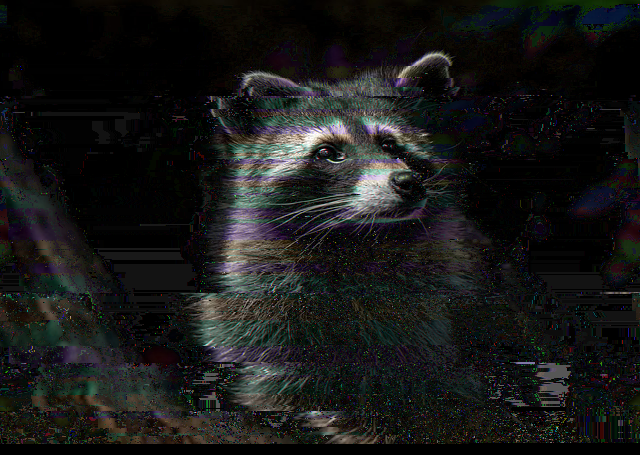
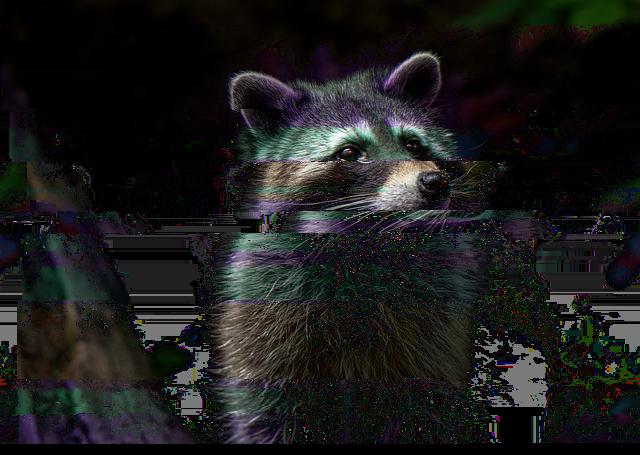
These different operations don’t tend to generate different classes of images, which in hindsight isn’t too surprising, as they’re all just going in and corrupting some bits, just in slightly different ways. They do offer an additional way to make the image break in a slightly different way, which is nice. Eventually I think I’ll just allow specifying the byte replacement directly, which will allow an even larger amount of fiddling with the input and output, although it makes the name more and more of a misnomer.
I mostly made this node in honor of my cool-looking corrupted Shond cover, and it was such a treat to see that I could recreate the behavior exactly.
Next up will (unless I change my mind again) be DXT1 compression, an effect that you do not normally see in artistic image pipelines.
-
These are hexadecimal representations of numbers.
41is 65 in base 10, or 01000001 in binary (base 2). A single byte will always be two hexadecimal characters. ↩︎ -
Yep, the representation for this is way longer. The farther you get away from text you’d need to represent in English in the 1960s, the longer the representations get. This is because the Unicode format evolved from the ASCII format, an American standard from the 60s. Unicode is essentially bolting on support for any arbitrary character that people are able to petition for addition. It can represent over a million different symbols, which means it won’t be filling up any time soon. ↩︎
-
Carriage return and line feed are typewriter terminology meaning “return where it’s typing to the left hand side” and “move the paper up in the typewriter so I can type on the next line”, respectively. Not as relevant in today’s world. ↩︎
-
I haven’t actually noticed this in quite some time, so I think pretty much everything papers over the differences these days. This very glitch comes from an attempt at papering over the difference. ↩︎
-
This is a simplification, since you can configure this behavior, but it’s what it does by default. ↩︎
-
If this was a git heuristic running into a wrong case, it wouldn’t be the worst assumption—my pdf was mostly text. I wouldn’t be surprised if that tipped it into “we should normalize this” territory. ↩︎
-
Red FF0000 Green 00FF00 Blue 0000FF . ↩︎
-
When I was authoring the pdf, I would have had it keep the images in a lossless format, as they weren’t big and I didn’t want it to look worse. ↩︎
-
Actually, now that I think about it, maybe other images were corrupted. I deleted that pdf long ago and while I could reproduce it, I’m not sure I care enough to. ↩︎
-
I would guess hard enough that I wouldn’t have spent the time. ↩︎
-
DEFLATE has a 4-byte checksum at the end. This is telling us that it failed. ↩︎
-
DEFLATE was invented in 1996. I’m surprised, in the interim, people haven’t decided on a third compression algorithm to put in here. I would think that it was because people have moved on to other compression types, but my pdf was using this in 2023 so I’m not sure. Guess it works well enough. Or the
11proves a useful signal for detecting corruption. ↩︎ -
It might seem confusing as to how to represent these two values in one data stream, since a byte can be anything. This will be explained with Huffman coding. ↩︎
-
This is kind of a lie, as most of the lengths implicitly include a “and then read the next X bits” extension. ↩︎
-
Deleting a whole byte, as we’re doing here is the same concept. ↩︎
-
It’s a simplification: I removed the secondary distance encoding, which probably would make it take a little longer to get back in alignment. ↩︎
-
Recovering means that all image bytes will be identical. It can still render differently if, say, it’s off by a byte or two (% 3), as it will shift the channels the bytes go into. ↩︎